
Your money,
finally organized.
Track spending, budgets and investments in one calm, private place — for iPhone, iPad and Mac. No bank logins. No ads. No data for sale.
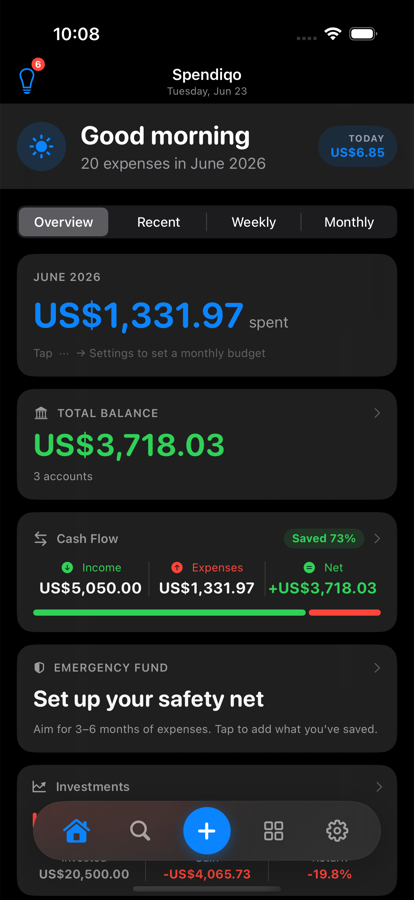
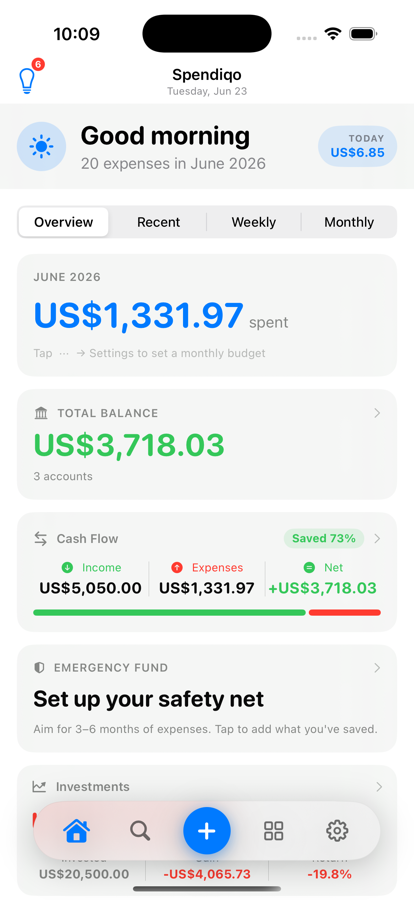
Everything, automatically
Built for how money actually moves
Logs itself from your bank texts
Spendiqo reads the bank SMS your phone already gets — even while it's locked — and quietly logs the transaction, picks a category, and skips the promotional spam without you lifting a finger. No bank login. No screen scraping. The message never leaves your device.
- Works locked, via a one-time Shortcuts setup
- Smart spam filter you can teach
- Auto-matches the right card or account
Every currency, every kind of holding
Fixed deposits, gold, stocks, crypto, mutual funds — tracked with live prices, real FX rates, and proper XIRR returns. Money in three currencies? Spendiqo converts everything to the one you think in, automatically.
- Live prices & daily FX refresh
- True money-weighted (XIRR) returns
- Price-drop & target-reached alerts
Nudges you before you overspend
Set a monthly budget and Spendiqo tells you what's safe to spend today, not just what you've already spent. Bill reminders, price-drop alerts and maturity notices arrive exactly when they're useful — never as noise.
- "Safe to spend today" on the home screen
- Bill & fixed-deposit maturity reminders
- Home Screen widgets & Live Activities
Private by design, not by policy
Your transactions are yours. Full stop.
No bank API, no third-party data broker, no account required to use the app. Everything lives in your own iCloud, encrypted the same way your Photos are. The only thing we ever see is anonymous, aggregate product analytics — never a transaction, a balance, or anything that could identify you.
Read our privacy policy →iCloud, not our servers
Your data syncs through your own private iCloud — we never run a database of your finances.
Encrypted local backups
Export an encrypted backup file any time, restore it on any device — no account needed.
Anonymous by default
Product analytics carry no name, email or device fingerprint — and you can switch them off entirely.
And the rest of the toolkit
Small details that add up
Multiple accounts
Cash, cards and wallets, auto-matched by the last 4 digits of your card.
Custom categories & rules
Teach Spendiqo your own merchants and it'll remember next time.
Activity timeline
A running log of every import, edit and change — so nothing's a mystery.
Savings goals & forecasts
See whether you're actually on pace, not just how much you've saved.
Bill reminders
Never miss a due date — reminders fire even when the app's closed.
Home Screen widgets
Spending limit and portfolio value, glanceable without opening the app.
Spendiqo Pro
Free covers daily tracking. Pro unlocks the power tools.
Free
$0
forever
- Unlimited manual expense tracking
- Investments & live prices
- Budgets, goals & widgets
- iCloud sync across your devices
Pro
$1.99/mo
or $14.99/yr — save 37%
- Auto-import from bank SMS
- Custom categories & merchant rules
- Message templates & smart spam filter
- Encrypted backup & restore
Questions
Good to know
Does Spendiqo need my bank login?
Never. There's no bank API, no screen-scraping, no credentials of any kind. Auto-import reads the SMS notification your bank already sends you and parses it entirely on your device — the message itself never leaves your phone.
Where is my data actually stored?
On your device, synced through your own private iCloud account if you turn sync on. We don't operate a database of anyone's transactions — there's nothing on our servers to lose, leak or sell.
Which devices does it work on?
iPhone and iPad running iOS 26 or later, and Mac running macOS 15 or later — with one shared iCloud sync, so a transaction added on your phone shows up on your Mac instantly.
What exactly is in Spendiqo Pro?
The free tier covers everyday tracking — manual expenses, investments, budgets, goals and widgets, fully synced. Pro adds the automation layer: SMS auto-import, custom category rules, message templates, the spam filter, and encrypted backup/restore. There's a 7-day free trial on the yearly plan.
How do I stop promo messages from being logged as expenses?
Spendiqo has a built-in spam filter that automatically skips promotional texts, marketing offers, and OTPs — so they never turn into expenses. If the occasional promo still slips through, you can teach it using the Spam Filter (Spendiqo Pro).
How the built-in filter works
Before any message is logged, Spendiqo checks for promo keywords ("offer", "win", "discount"…), opt-out footers, and OTP patterns. If any match, the message is skipped and the Activity feed records it as "Skipped — looks like a promo".
Adding your own words
- Open Settings → Auto-import Bank SMS → Spam Filter
- Tap + and type a word or phrase that appears in the messages you want to ignore — for example a recurring e-bill's account number, or the word "cashback"
- Use the Live Test field to paste a message and confirm it's marked as spam before saving
- Tap Save — any future message containing that word is skipped, even if it looks like a real transaction
Your word list travels with your encrypted backup and syncs across devices. Use specific words — a whole account number rather than a generic word — so you don't accidentally block real transactions.
How do I make sure expenses land in the right category?
Spendiqo categorizes transactions automatically based on merchant names, and it learns from how you correct it. For merchants it doesn't recognize at all, you can set a permanent rule in seconds (Spendiqo Pro).
Let Spendiqo learn from corrections
- Open any transaction that landed in the wrong category
- Tap the category field and pick the correct one
- Save — Spendiqo remembers this merchant → category mapping and applies it to every future import automatically
Set a permanent rule manually
- Open Settings → Category Rules
- Tap + and type the merchant name as it appears in your bank messages (e.g. SHELL)
- Choose the category to map it to (e.g. Transportation)
- Tap Save — this rule takes priority over the built-in guessing from now on
Custom categories
Need a category Spendiqo doesn't have? Go to Settings → Manage Categories → + to create one with your own name, icon and colour. Once created, it appears everywhere categories are used — rules, budgets, reports — and renaming it automatically updates all existing transactions.
Is this a big company or a one-person app?
One developer, building the tracker they actually wanted to use. No investors, no growth targets, no dark patterns — just an app that has to earn your subscription by being useful.
My bank messages aren't recognized — how do I set up a template?
Spendiqo has a built-in parser that handles many common formats, plus ready-made starter templates for popular Sri Lankan banks. If your bank isn't picked up automatically, you can teach Spendiqo its exact format in a few minutes using Message Templates (Spendiqo Pro).
Step 1 — Try the starter templates first
- Open Settings → Auto-import Bank SMS → Message Templates
- Tap + → Add Sri Lankan bank samples
- Find your bank in the list and tap it to open it
- Paste a real message into the Live Test field at the bottom — if the amount, merchant and date all appear correctly, tap Enable and you're done
Step 2 — Create a custom template if needed
- Tap + → New Template and give it a name (e.g. "My Bank debit")
- Write the pattern, replacing the variable parts of your bank message with tokens:
{amount}The transaction amount{currency}Currency code (LKR, USD…){merchant}Shop or payee name{date}Transaction date{card}Last 3–4 digits of card{*}Skip any text hereExample
Your card ending 2366 was charged LKR 523.00 at SHELL on 02 Jul 2026.
- Paste a real message into the Live Test field and confirm the extracted values look right
- Toggle Enabled — Spendiqo will now use this template before its built-in parser
Templates are backed up with your data and sync across your devices via iCloud.
Ready when you are
Take control of your money today.
Free to download. No account required. Your data stays yours.
Free · Spendiqo Pro from $1.99/mo · 7-day free trial